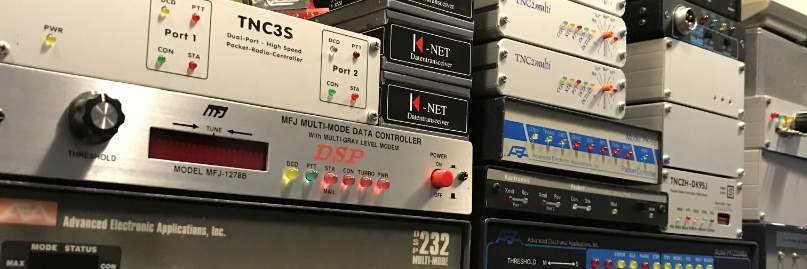
Netrom link quality

Hier onder een stukje wat ik tegen kwam in het bbs, het gaat over de quality van een netrom link. Geschreven door John G8BPQ.

——————–
Quality isn’t measured. It is assigned by the sysop to a Netrom link,
and calculated by the node for a Netrom route. In this context a link is
the path between two adjacent stations, and a route is a path between
two stations over one or more links.

Quality doesn’t necessarily define how “good” a link is. It is used by
the software to select the route to use when more than one route exists
between two nodes. Desirability would be a better term. While this may
be related to how good the link is it might include other factors (eg
give preference to RF links and only use Internet links as a backup if
the radio link fails). It is expressed as a number between 0 and 255.
When a route is over two links, the route quality is calculated by
multiplying the link qualities together and dividing by 256. So for two
links of quality 192 the route quality is 144.

The “standard” default quality is 192. You might change this if you
had two links between two stations (maybe a UHF trunk link and a VHF
user link). By assigning a higher quality to the UHF link traffic would
be routed over it and would only use the other if the first failed.

The Netrom routing mechanism was designed to be self learning, building
routing tables from broadcasts heard from other nodes. This can work
quite well, but only if you don’t have any one way paths. If you can
hear a node but not connect to it the system simply doesn’t work. It
sounds from what you have said that is is what you are seeing. Unless
you deliberately disable the mechanism, BPQ will try to keep a link open
to each node it hears a routing broadcast from, and remove it from the
tables if the link can’t be established (or fails) but in the meantime
the routing entries will be used and may be passed on to other stations.

With your current configuration you will add to your table any stations
you hear a routing broadcast from with a quality of 192. This is a
reasonable starting point if you can connect to all the stations you can
hear. If not, there are two approaches you can use. You can ignore
routing messages from specific nodes that you know you can’t connect to
by adding a locked route with a link quality of zero, or you can set the
PORT QUALITY parameter below MINQUAL, so that nothing is automatically
added, and lock routes to the stations you know you can connect to with
a link quality of 192. The second option requires more active
management, but is likely to give a more stable network.

I’m not sure if this has directly answered your question, but hopefully
will help you understand the issues more.
73,

John G8BPQ
———————

Pk232 DCD setup (howto)

Msg # 12990 Type:B Stat:$ To: ALL @ALLOH From: KA8TEF Date: 05-Sep/1912
Subject: Setting the DCD THRESHOLD of the 232
Bulletin ID: 5373_N8FIS
Path: AD8I!N8FIS

The following is a reprint of a article in the TAPER newsletter August
1988 Issue 32.

AEA PK-232 Notes:
by Eric Gustafson

Recently, several new packeteers using PK-232s have appeared on our local
duplex repeater which is dedicated to packet radio. This is one environment
where the collision frequency should be verylow since there are no hidden
terminals. Almost immediatly we noticed that the collision frequency had risen
dramatically. After some investigation we discovered certain stations were
almost guarenteed to be involved in stepping on in progress packets. These
stations were contacted and in all but one case they were new users of PK-232s
units.

We were very puzzled as there have always been some stations on the
repeater using PK232s with no apparent
problems. The new stations were asked how their station was configured and
what method was used to get the DCD operation adjusted. We were very
surprised at the answers we got. Every single one of the offending stations
had set their stations up according to the instructions in the PK-232 manual.
However, contrary to the advice given in the manual, none of these stations
had configured their setup so that they could hear what was going on on the
channel when the PK-232 was connected to the radio. None of these new
operators knew what DCD meant, what it did, or why it was important that it
should be working on a multiple access packet channel.

We obtained a PK-232 and the manual to try to discover the exact
nature of the problem. What we found was that although the manual is very
complete and generally very well written, there are some areas where it
leaves something to be desired. Specifically, in this case, the
instructions given on page 2-16 (we had manual PK232UG Rev.B 9/86) for setting
up the PK-232 and an FM radio for DCD operation are simply incorrect. If set
up exactly as described, DCD will NEVER be asserted during a packet trans-
mission by another station on the channel! We had found the cause of our
problem.

If you have a PK-232 and haven’t already discovered this problem for
yourself, please disregard the instructions in the manual for setting
up a PK-232 and NBFM radio for 1200 baud operations and use the method
presented here. All your packet neighbors will appreciate it very much.

The manual is quite correct EXCEPT where they discuss setting the DCD
THRESHOLD control and receiver audio output level for proper demodulation
and DCD circuit operation. The corect way to set these adjustments is :

1. At least temporarily, arrange to
be able to hear the receiver audio
signal which is being sent to the PK-232.

2. Set the squelch circuit on the
radio for normal squelched operation.
The DCD circuit in the PK-232 is in
capable of proper operation with unsqueched
audio from the receiver.

3. While monitoring incoming packets,
adjust the receiver audio level so
indicator “spreads” fully when
receiving a packet on the channel
which produces the LEAST amount of
audio output level. There are several
limiters in the PK-232 demodulator
so louder stations will not be affected
adversely by this.

4. Once the audio level is properly
set, adjust the DCD THRESHOLD control
on the PK-232 so that the DCD led
lights when there is a packet being
transmitted by the station on the
channelwhich produces the LEAST amount
of audio output from the receiver.
Make sure that the DCD LED is extinguished
when there is no signal and the radio’s
squelch circuit has cut off all audio
from the receiver.

If the above procedure is followed, the PK-232 will properly hold
off transmitting during a packet transmission from another station and
will not send acknowlagements to individual frames of a maxframe greater
than 1 packet while it is still being transmitted.

We hope PK-232 owners will find this information useful and take the
steps to assure that their DCD is operating properly. Multiple access
packet channel throughput is severly degraded when DCD is not working.

Hope this helps out
73 Phil KA8TEF

Xrouter onder Win98 met Baycom modem.

Xrouter onder Windows met een Baycom Modem
v0.40 = 8 Mei, 2003
Deze DOC is geschreven door Richard de CB1RAM

Index :

1. Website’s waar je de software kan downloaden
2. Instellingen voor Xrouter
3. Bestanden die in C:\WINDOWS\SYSTEM moeten staan
4. Regels die toegepast moeten worden aan AUTOEXEC.BAT
5. Thanks to

Allereerst ga ik er vanuit dat je Windows 98 gebruikt. Hoe het met
andere versies is, zoals 2000, NT en XP, weet ik helaas niet.

Ik ga er vanuit dat Xrouter in de map C:\XROUTER staat.

Mocht dat bij nou anders zijn, dan moet je zo her en der wat dingen
aanpassen.

1. Website’s waar je de software kan downloaden

Xrouter:
https://packet-radio.net/wp-content/uploads/2017/04/Xr-Bm.zip

2. Instellingen voor Xrouter

Ik ga er vanuit dat je Xrouter al op je computer hebt staan.

Voorbeeld voor Compoort 1 (3F8) ( XROUTER1.BAT ) :

lh node2bay -I4 -B3f8 -i60 -dbaydrv.vxd
lh pzthost.exe

Voorbeeld voor Compoort 2 (2F8) ( XROUTER2.BAT ) :

lh node2bay -I3 -B2f8 -i60 -dbaydrv.vxd
lh pzthost.exe

Deze 2 opstart bestanden staan ook wel in dit pakketje.

XROUTER1.BAT => Voor Baycom Modem op compoort 1 (3F8)

XROUTER2.BAT => Voor Baycom Modem op compoort 2 (2F8)

Zet alle 6 bestandjes die in dit pakketje zitten (XROUTER)
in de directory waar XROUTER.EXE ook in staat.

BAYDRV.VXD
NODE2BAY.EXE
PZTHOST.EXE
XROUTER.CFG <<< Verander de call , nodecall en alias wel even.
XROUTER1.BAT
XROUTER2.BAT

Deze bestanden staan in dit pakketje (XROUTER)

3. Bestanden die in C:\WINDOWS\SYSTEM moeten staan

Deze 2 bestandjes moeten in de system directory gezet worden.

BPQCODE.386
BPQDLL.DLL

(staan ook in dit pakketje (WINDOWS)

4. Regels die toegepast moeten worden aan AUTOEXEC.BAT

SET PATH=C:\XROUTER;
CD XROUTER
XROUTER1.BAT ( Voor Baycom Modem op compoort 1)
CD\

CD XROUTER
XROUTER2.BAT ( Voor Baycom Modem op compoort 2)
CD\

5. Thanks to

NL2STK: Deze beste man heeft mij geholpen om Xrouter met
een Baycom Modem aan de praat te krijgen.

(c) 2003 by Richard

Jaarvergadering verslag SRGW

[FBB-7.07-AB1FHMRX$]
PI8LAP BBS, Kortgene.
Hello Niels. 549 active messages, last is 2495, last listed is 80.

Assigned channels:
Ch. 5 (TELNET) : PD2LT-0 – Sun 26/03/17 05:40
Ch. 12 (LINK) : PI1LAP-0 – Sun 26/03/17 05:15

(2) PI8LAP BBS>
r 2495
From : PD2NLX
To : INFO@NLD
Type/Status : B$
Date/Time : 25-Mar-17 08:50
BID (MID) : 2495_PI8LAP
Message # : 2495
Subject : Jaarvergadering verslag SRGW

De Stichting Repeater Groep Walcheren heeft onlangs haar jaarvergadering gehouden in
Vlissingen.
Tijdens deze goed bezochte bijeenkomst is kort teruggekeken naar 2016,
daarna is er vooral gekeken naar de toekomst van het repeaterlandschap op Walcheren
en omstreken.

Momenteel zijn drie repeaters gelinkt aan de SRGW: PI1VLI (D-STAR) in Vlissingen-Centrum,
PI2VLI in Vlissingen-Paauwenburg en PI3VLI in Oost-Souburg. Daarnaast is ook een Winlink
opstappunt aanwezig op de locatie van PI2VLI.

=============================
Onderhoud:
=============================

De UHF D-STAR repeater PI1VLI heeft eind december 2016 een nieuwe update gekregen in
zowel de hard- als software. Guus PE1PLM heeft deze repeater in beheer t.b.v. de SRGW.

Sinds december 2016 is PI1VLI gelinkt via Hamnet.
Vanuit de TV toren in Goes en de locatie van de DMR repeater PI1ZLD in Zierikzee loopt het Wifi netwerk naar de locaties in Vlissingen. De VHF stadsrepeater PI3VLI heeft eind december 2016 volledige CTCSS gekregen. Zowel op de in- als uitgang is nu 88,5 Hz aanwezig.

=============================
Plannen op korte termijn
=============================

Sinds 2002 staat in Oost-Souburg de stadsrepeater PI3VLI. Toenmalige reden van het on-air
brengen van een VHF repeater voor Middelburg-Vlissingen was dat de toen regionale VHF
repeater PI3GOE in Wemeldinge geen goed bereik had voor gebruikers op Walcheren.
Inmiddels, 15 jaar later, zijn er hele andere ontwikkelingen op gebied van VHF repeaters in
Zeeland. Zo is er sinds twee jaar de landelijke VHF repeater PI3UTR (145.5750 MHz) en is er
nog steeds vanuit Overslag/Westdorpe PI3ZVL (145.6000 MHZ). Voor de regio Zeeland is de
regio-dekkende VHF repeater PI3GOE (145.7750 MHz) welke uitzendt vanuit de TV toren in
Goes maar ontvangers heeft in Wilhelminadorp, Zierikzee, Kamperland en Breskens.
Met het installeren van Hamnetlink in Vlissingen is er in de vergadering besloten dat een extra
ontvanger voor PI3GOE zal worden geplaatst op de locatie van PI1VLI (Vlissingen-Centrum).
Hiermee zal het porto- en mobiel bereik van PI3GOE uitbreiden op zowel Walcheren als ook in
West Zeeuws-Vlaanderen. Een groot voordeel van een extra PI3GOE ontvanger ( 145.1750 MHz TQ 77,0 ) is dat mobiele stations in Zeeland een prima bereik krijgen over de gehele A58 maar ook op de doorgaande
wegen in Zeeuws-Vlaanderen, Walcheren, de Bevelanden, Schouwen-Duiveland en Tholen.
Wanneer de extra ontvanger van PI3GOE dit voorjaar is geactiveerd, zal een periode
aanbreken van het testen van de dekking, zowel porto- als mobiel bereik.

=============================
Plannen op lange termijn
=============================

In de SRGW vergadering is de VHF repeater PI3VLI uitvoerig besproken. Het doel van de in
2002 geactiveerde repeater lijkt met de komst van de extra ontvanger van PI3GOE in Vlissingen
achterhaald. Gezien het aantal (mobiele) gebruikers en de stadsgewestelijke dekking is
unaniem besloten dat de aanwezigheid van PI3VLI op termijn geen functie meer heeft.

Met de aanwezigheid van twee repeaters op Walcheren (PI2VLI en PI3VLI) en de komst van
een nog betere dekking van PI3GOE op Walcheren is ervoor gekozen dat op termijn de VHF
repeater PI3VLI zal worden uitgezet. Gebruik van PI3GOE zal daarom worden gestimuleerd.
Voordelen van het gebruik van PI3GOE:

– Betere dekking voor mobiele- en vaste amateurstations, verspreid over Zeeland
– Minder versnippering van gebruik van weinig amateurs op meerdere repeaters
– Meer communicatiemogelijkheden tussen amateurs Zeeland-breed

PI3GOE heeft nu al een ruime dekking. Probeer eens op 145.7750 MHz (TQ 77,0)
=============================
Functie PI2VLI
=============================

In de SRGW vergadering is tevens gesproken over de functie van de UHF repeater PI2VLI.
Er is unaniem besloten dat de aanwezigheid van een lokale repeater op Walcheren een wens
blijft. Doordat veel transceivers zowel VHF als UHF kunnen zenden en ontvangen, is besloten
dat de UHF repeater PI2VLI operationeel zal blijven. Op deze manier blijft er voor de regio
Walcheren e.o. een back-up en/of uitwijk frequentie.

Op termijn zullen zowel de SRGW als de lokale afdelingen via de beschikbare middelen het
gebruik van PI2VLI en PI3GOE gaan promoten. Tevens zal er aangekondigd worden wanneer
PI3VLI QRT gaat.

Met de Technoronde op 145.225 MHz, lokale evenementen op PI2VLI ▒n 145.225 MHz, met de
regionale repeater PI3GOE op 145.7750 MHz en de lokale repeater PI2VLI op 430.3375 MHz
hoopt de SRGW, i.s.m. de beheerders van Hamnet en PI3GOE, ook de komende jaren een
goed analoog repeater-bereik te realiseren.

=============================
APRS digi-repeater
=============================

Op de vrij te komen locatie in Oost-Souburg zal een APRS digi-repeater komen welke het
APRS dataverkeer van porto- en mobiele amateurstations op Walcheren zal doorsturen op de
frequentie 144.800 MHz. Hiervoor worden inmiddels de technische voorzieningen voorbereid.
Tot zover de update.

Meer info via www.srgw.nl

— End of message#: 2495 from PD2NLX to INFO —

Nieuwe firmware

Vandaag de pk-88 van Roland PD2RLD voorzien van een frisse eprom.

Dit modem kan nu weer gewoon in kiss gebruikt worden.

Leuke van Roland zijn pk-88 is dat er een dcd printje in zit, iets wat ze standaard niet hebben!

Als bedankje mocht ik de oude eprom houden met wa8ded firmware, deze had ik nog niet voor de pk-88 dus daar was ik weer erg blij mee 🙂

Back-up script(je)

Aangezien dat alles kapot kan, is het wel makkelijk dat je een back-up maakt van de software die je gebruikt. Aangezien ik geen zin heb omdat handmatig te doen heb ik hier een klein scriptje voor geschreven. Dit script maakt Incrementele back-ups en tar back-ups. Met crontab wordt het elke nacht om 3 uur uitgevoerd. Handig joh.


#!/bin/bash
# Backup script voor het backuppen naar een remote server op deze planeet.
# Created on 12-03-2017
# Author = Niels
# Version 012.9
# Key copyeren naar de remote server.
# ssh-keygen -t rsa
# ssh-copy-id user@123.45.56.78
# Crontabje :)
# 0  3    * * *   root    /usr/local/xnet/backup.sh
# service cron reload
#
LOG_FILE=/usr/local/xnet/backup.log
exec > >(tee -a ${LOG_FILE} )
#
##################Config optionsssss################################
TIME=`date +%b-%d-%y` # Datum toevoegen
SERVER=user@123.45.56.78 # Ssh`en remote username en ip.
REMOTEDES=/home/pd2lt/backup-packet # Remote directory
REMOTESYNC=/home/pd2lt/backup-packet/rsync # Remote rsync Directory
REMOVE=$(date --date="7 days ago" +%b-%d-%y) # filetjes ouder dan 7 dagen wegsmijten
# Tar File name
FILE=backup-xnet-$TIME.tar.gz # Backup file name
FILE2=backup-fbb-$TIME.tar.gz # Backup file name
FILE3=backup-conversd-$TIME.tar.gz # Backup file name
# Source pad.. Wat moet er gebackupd worden.
SRC=/usr/local/xnet # Watte.
SRC2=/usr/local/etc/ax25 # Watte.
SRC3=/usr/local/etc/conversd # Watte.
# Source pad. Local
DESDIR=/home/pd2lt/backup-packet # Waaro.
set $(date)
####################################################################
#
if test "$1" = "Sat" ; then
        # Let`s tar it
        tar -cpzf $DESDIR/$FILE $SRC
        tar -cpzf $DESDIR/$FILE2 $SRC2
        tar -cpzf $DESDIR/$FILE3 $SRC3
        #
        # Copy naar remote server, en vermoord filetje ouder dan 7 dagen.
        scp $DESDIR/$FILE $SERVER:$REMOTEDES && rm backup-xnet-$REMOVE.tar.gz
        scp $DESDIR/$FILE2 $SERVER:$REMOTEDES && rm backup-fbb-$REMOVE.tar.gz
        scp $DESDIR/$FILE3 $SERVER:$REMOTEDES && rm backup-conversd-$REMOVE.tar.gz
        #
else
        # Let`s sync it :)
        rsync -avz -e 'ssh -ax' $SRC $SERVER:$REMOTESYNC
        rsync -avz -e 'ssh -ax' $SRC2 $SERVER:$REMOTESYNC
        rsync -avz -e 'ssh -ax' $SRC3 $SERVER:$REMOTESYNC
        #
fi
# Mail backup log
mail -s "Backup log $TIME" pd2lt@emailadres.net < backup.log
echo "Script finished on $TIME"
rm -f backup.log
# Beetje info spuwen
df -h > /tmp/mail_report.log
free -m >> /tmp/mail_report.log
ps ax >> /tmp/mail_report.log
mail -s "disk and RAM report" pd2lt@emailadres.net < /tmp/mail_report.log

De laatste paar regels….. Het back.log bestand wordt gemaild en nog wat info over het systeem. Schijf gebruik, ram gebruik en de processen die draaien.

Ssh brute force.

Aangezien ik helemaal gek wordt van die “script kiddies” die aan het hameren zijn op allerlei poorten. Heb ik wat toegevoegd aan de firewall. (Dit is een voorbeeld)

iptables -A INPUT -p tcp -m tcp --dport 22 -m state --state NEW -m recent --set --name SSH --rsource
iptables -A INPUT -p tcp -m tcp --dport 22 -m recent --rcheck --seconds 30 --hitcount 4 --rttl --name SSH --rsource -j REJECT --rejec$
iptables -A INPUT -p tcp -m tcp --dport 22 -m recent --rcheck --seconds 30 --hitcount 3 --rttl --name SSH --rsource -j LOG --log-pref$
iptables -A INPUT -p tcp -m tcp --dport 22 -m recent --update --seconds 30 --hitcount 3 --rttl --name SSH --rsource -j REJECT --rejec$

Ampr Gateway

Configuratie voorbeeld van een Ampr Gateway. Hier heb je het volgende programma(tje) voor nodig.
http://www.yo2loj.ro/hamprojects/ampr-ripd-1.15.tgz

Ik heb dit toegevoegd in het filetje /etc/rc.local zodat het bij het booten van het systeem automatische wordt geladen.

######################### tunnel ampr.org ################################
ifconfig tunl0 up 44.137.31.65/27 multicast
#ip tunnel change ttl 64 mode ipip tunl0
ip link set dev tunl0 up
################# default route naar gw-44-137.ampr.org ##################
ip route add default dev tunl0 via 213.222.29.194 onlink table 44
######################## route ampr.org #################################
ip rule add to 44.0.0.0/8 table 44 priority 44
ip rule add from 44.137.31.64/27 table 44 priority 45
route add -net 44.0.0.0 netmask 255.0.0.0 tunl0
ip route add 44.137.31.64/27 dev tunl0 table 44
## Start ampr-ripd to learn rest of mesh routes
/usr/sbin/ampr-ripd -r -s -i tunl0 -a (extern ip-adres) -t 44 -p (password)

Voor de rest heb ik nog wat regeltjes toegevoegd in de firewall. (de geleerde zullen er wel opmerkingen over hebben. Maar dit werkt voor mij)

-A INPUT -s 44.0.0.0/8 -j ACCEPT
# Block all non 44 incoming traffic
-A INPUT ! -s 44.0.0.0/8 -i tunl0 -j DROP
-A INPUT -i eth0 -p ipencap -j ACCEPT
-A INPUT -p udp --dport 520 -j ACCEPT
-A FORWARD -s 44.128.0.0/16 -j REJECT --reject-with icmp-port-unreachable
-A FORWARD -d 44.128.0.0/16 -j REJECT --reject-with icmp-port-unreachable
# Only allow ampr.org traffic ######
-A FORWARD -i tunl0 -o eth0 -s 44.0.0.0/8 -j ACCEPT
-A FORWARD -i eth0 -o tunl0 -d 44.0.0.0/8 -j ACCEPT
#####################################
-A FORWARD -d 44.0.0.0/8 -j ACCEPT
-A FORWARD -s 44.0.0.0/8 -j ACCEPT

Pi1lap / Pi8lap Multi service systeem

PI1LAP is een multi service netwerk node in Kortgene Regio 33 JO11VN.
Running software (X)Net v1.39 / F6fbb v7.07

  • Net/ROM
  • INP3
  • Flexnet
  • Axip/Axudp
  • Converd-saupp PI8LAP-8 (Gelinkt met HUB_NL(PI1CDR))
  • Ftp
  • Http
  • F6fbb BBS PI8LAP
  • Lap 1k2 144.850Mhz
  • Lap 1k2/9k6 430.950Mhz
  • Lap 300Baud HF 14.105Mhz (Wordt aangewerkt)

Op het systeem van PI1LAP/PI8LAP draait Debian Wheezy. Dus alle configuratie bestanden zijn getest op Wheezy hoe het op Jessie draait “geen idee”